69

This is a userscript that provides a networkwide flag summary for all Stack Exchange sites.

If you are logged into the Stack Exchange network and you have this script installed, you can visit the flags tab in your Stack Exchange profile:
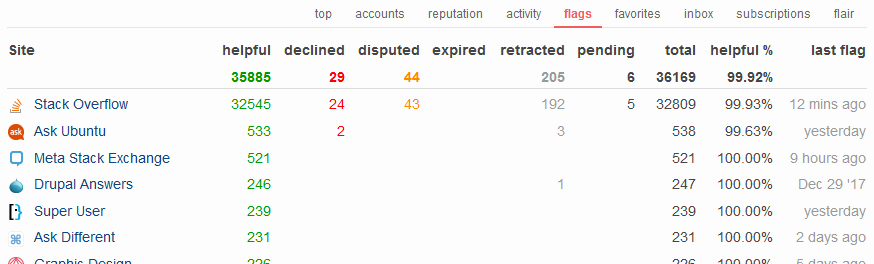
SEGFS screenshot

How does it work?

The script scans your network profile for all Stack Exchange accounts you created. For each account it tries to access the flag summary page. Since that page is private, i.e. only visible to you (and mods), you need be logged in. From there it extracts the flag summary of the individual site and sums it all up in a generated table.

The table can be sorted ascending & descending by clicking on the desired column label.

You can find a link to the global flag summary on each per-site flag summary page.

Install

Install from Github

View source on Github

Tested with Greasemonkey & Tampermonkey on Firefox

Changelog

v1.1   Request rate and error handling improvements.

v1.0   Including all Meta sites; Greasemonkey 4.0 support.

v0.8   Fixed Area51 URL; Added site count with progress; Improved sorting.

v0.7   Fixed meta sites and HTTPS links; Enumerated table rows.

v0.6   Changed helpful % formula to helpful / (helpful + declined) * 100; Support for meta sites (limited) and Area 51.

v0.5   Initial release.

21
  • 14
    There's another use case for this script. The retrieval of the flag summary counts as a site visit for the Enthousiast & Fanatic badges. You just have to visit the global flag summary once a day. Commented Jan 11, 2017 at 8:33
  • At the moment, the script uses the site specific "last flag date", this works fine with the english sites, but it looks weird mixed with the other language stack overflow sites Commented Jan 11, 2017 at 20:23
  • You also missed the "Aged away" flag status Commented Jan 12, 2017 at 7:13
  • @Ferrybig now it should be english everywhere. The "aged away" is supposed to be the "expired" column, or doesn't that work for you? Commented Jan 12, 2017 at 9:31
  • Confirmed the all english working after script update, didn't see the expired column because I was looking for "aged away" as that's the name SE uses in the normal flag screen Commented Jan 12, 2017 at 9:36
  • This doesn't work for sites in private beta, BTW. Commented Jan 18, 2017 at 21:24
  • 2
    @Mithrandir Found the issue: The site is not listed in the account list, because it's a private beta.. Commented Jan 18, 2017 at 22:07
  • Huh, now it's counting the private beta site. Commented Jan 23, 2017 at 14:08
  • @Mithrandir noticed that too. Not sure what's going on, maybe it was just caching.. Commented Jan 23, 2017 at 14:19
  • 1
    The Area 51 link still links to discuss.area51, instead of area51.meta, just FYI. Commented Jul 23, 2017 at 9:22
  • I flagged a comment on a post where I can previously flagged some comments. The flag summary script then showed my last flag as being from when I flagged those comments last time - like this. Not sure how easy this'll be to fix, or if it's even worth any time but thought I'd point it out. Commented Sep 13, 2017 at 12:52
  • Can we discount the comment flags from the global flags summary? Commented Sep 20, 2017 at 5:32
  • @NVZ why would you want that? comment flags are flags too. Commented Sep 20, 2017 at 12:49
  • Floern, any chance this is going to the Chrome Web Store, so I don't have to follow all those instructions on installing an extension outside of the Chrome Web Store? Or can you give a crx instead of a js pretty please? Might be asking wrong questions. Anything helpful would be appreciated. Commented Mar 23, 2018 at 12:13
  • @BCLC I don't think this would make sense. If you didn't work with userscripts before, just install the Tampermonkey extension from the Chrome Web Store, and then click the "Install from Github" link above. Commented Mar 25, 2018 at 20:30

0

You must log in to answer this question.

Start asking to get answers

Find the answer to your question by asking.

Ask question

Explore related questions

See similar questions with these tags.